xlax
[See a real screenshot]
[See an ANIMATED screenshot (v2.2)] (may be slow on older machines)
Overview
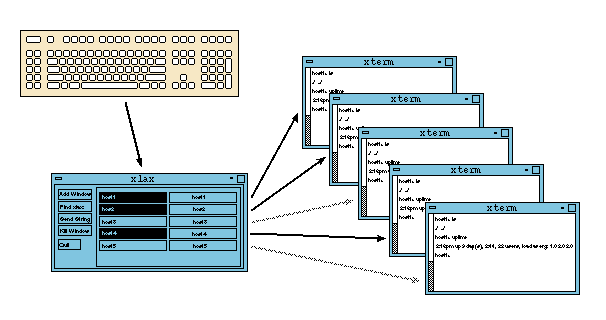
xlax accepts keyboard input from the user and sends it to
multiple X11 windows (usually xterms or other terminal windows). It's an ideal
tool for system adminstrators who have to do the same thing on multiple
machines, or in multiple directories. It allows the virtual connections
to windows to be turned on and off, so that only a subset of current
windows are in use (this is shown in the diagram above, where the third and
fifth windows in the list are not selected).
The user can also assign a different text string to
each window which will be sent by clicking on the "Send String" button.
In a typical usage, a user might need to check a few things and run a
number of commands on five different machines. After setting up all the
windows to work with xlax (see below), and with send strings
set to hostnames, the user will type "ssh " and then click "Send String",
and then type return, and the user will simultaneously log into those
five different machines. They can then type the commands once and
see them run on all machines at the same time.
Setting up xlax and windows
In the simplest usage, you start xlax, and then click on the
"Add windows" button. You then click on windows that you want
xlax to talk to, and
click back on the xlax window again when you are done adding.
The added windows must have "Allow SendEvents" turned on, or xlax
won't
be able to talk to them. To set the send string, click on the box to
the right of the window name, and enter the string in the popup box.
Note that control characters including backspace and carriage return are
entered as literal characters so if you make a mistake you have to clear
and start over.
This method of setup can be tedious, and xlax also allows for
automated setup. If you press the "Find xlax:" button, or if you start
xlax with
-find, it will search for windows with a Name hint that starts with "xlax:"
and add them automatically. Additionally, any text after the "xlax:"
will be used as the send string. The "xlax:" prefix can be changed to
some other string with the "-prefix" option. For xterms, the name hint is
set with the "-name" option. Here's an example:
  example% xterm -xrm 'XTerm*allowSendEvents: true' -name xlax:string1 &
  [1] 555
  example% xterm -xrm 'XTerm*allowSendEvents: true' -name xlax:string2 &
  [2] 556
  example% xterm -xrm 'XTerm*allowSendEvents: true' -name xlax:string3 &
  [3] 557
  example% xlax -find &
While all this is an
improvement, it is still tedious to prepare all of the windows with the
proper Name hint. The real use for this method is to make window setup
script-able, for cases where you repeatedly need the same layout of windows.
One such script (mkxlax)
is included in this package, and is described below.
mkxlax
mkxlax
will create a number of xterms with the send strings preset. The simplest
form of using mkxlax is to simply provide a list of send strings:
mkxlax host1 host2 host3 host4 host5
This command will create 5 xterms, with sendEvents enabled, and with the
name hints set to the arguments, e.g. the first window will have a
name hint of "mkxlax:host1". mkxlax then starts up
"xlax -find -prefix mkxlax",
to find all the windows that have been set up.
mkxlax also
has options for controlling the positioning of the windows, allowing
them to be tiled or stacked, overlapped or not. It also has options for
using different xlax prefixes (with "-group") so that you
can run multiple mkxlax
commands at the same time without interfering with each other.
All of these options can be stored in a configuration file that lets
you have simple presets that you can bring up as needed. This can
include the list of send strings, but it doesn't have to. The presets
can be overridden on the command line. You can then have a quick
command like "mkxlax -layout macservers" to bring up all
of your mac servers in a particular arrangement on the screen, or
run a command "mkxlax -layout stack_vertical host1 host2 host3"
to layout an arbitrary set of windows in an arrangement that you've
predefined.
mkxlax is further described in a man page included in the
distribution.
Security concerns
xlax relies on the X11 sendEvents being allowed in order to work.
If your X server is not properly secured, anyone with a connection to your
display could send commands to these windows. Of course, if your X server
is not secured they could also do the same thing by other means, so in
this author's opinion, xlax doesn't add any significant
additional security risk.
It does of course multiply your ability to shoot yourself in the foot.
History
xlax was written in 1992 by Frank Adelstein, then at
Ohio State University's
Computer and Information Sciences Department. From my vague recollections,
the idea for the software came from Steve Romig, and the idea for the
name came from me. I'm not really sure that last bit is true, but since
I don't remember clearly, I can claim anything I like.
xlax was modified by me in 2007 to allow for automatically finding
windows based on the name hint. Also added was automatic dropping of
dead windows, and an improved interface for manually setting the send
string.
A different version of mkxlax was written by me initially
in maybe 1998.
It was completely rewritten in 2007 to accomodate xlax' ability to
automatically find and add windows.
Downloading and Compiling
Version 2.4 can be downloaded here.
BUG FIX! to 2.4 July 31, 2008
Spaces and punctuation were not correctly translated in send strings
or in pasting current selection. This is now fixed, in a way that should
be fully portable.
(Version 2.3 can be downloaded here.
June 11, 2008 - paste current selection
Fink package
of 2.3)
(Version 2.2 can be downloaded here.
June 6, 2008 - mkxlax: control xterm size and options)
(Version 2.1 can be downloaded here.
March 6, 2008 - mkxlax configuration file support)
(Version 2.0 can be downloaded here.
Aug 21, 2007)
(Prehistoric version can be downloaded here.
Nov 4, 1992)
 xlax is now
listed at
freshmeat.net.
If you want to be notified of changes on this project, please
subscribe
there (freshmeat account required).
xlax is now
listed at
freshmeat.net.
If you want to be notified of changes on this project, please
subscribe
there (freshmeat account required).
To compile:
cd (to some place where you have write access, and a spare 200KB)
cp /path/to/xlax2.3.tar.gz .  (if it is not already in this directory)
gunzip xlax2.3.tar.gz
tar xvf xlax2.3.tar
cd xlax2.3
xmkmf
make
Installation must be done by hand, but there are only four files to install:
xlax, mkxlax, xlax.man, and mkxlax.man (the man pages can be installed in
section 1 or section 8 at the user's discretion).
mkxlax uses perl (any version should work). To install, the first
line of the file may need to be changed to point to an existing copy of
perl.
Pretenders to the Throne
There are a number of other latecomers
out there that do similar things to what xlax does. In my
opinion, xlax together with mkxlax offers the most complete set of
features. I think xlax is the only one with send strings.
Plus it has the funniest name. Anyway here is the competition:
- keyboardcast is pretty similar in features to xlax. You can add and
drop windows interactively, and select and deslect which windows are
active at any time. It has a selection mechanism which is similar to
xlax' use of the name hint, however I believe keyboardcast uses the
window title, which depending on user's set up may end up being changed
by the shell to display current directory or whatever. It isn't clear
if there's any mechanism for starting a group of windows automatically
that are added in.
-
multixterm is yet another. It looks fairly feature-rich, and is
implemented in tcl/tk, and is designed to be easy to modify.
-
cluster ssh is a project with a program called cssh. More of the
same.
-
BitCluster is a whole collection of tools which include fanout, and
xfanout. fanout sends output to multiple terminals, and xfanout manages
windows. There's a ctelnet script wich serves to start things up,
probably similar to my mkxlax script.
-
pconsole uses a mechanism that does not require X11, rather it sends
input directly to the terminal devices. Because of this it requires
root access. It has the odd feature of displaying everything you type
(including passwords) in the original pconsole window. Windows can
be added and deleted through a command-line interface (you have to know
the tty device name of the local terminal, which can be a problem
if you've already connected that window to a remote system. Some of the
docs imply that pconsole can start pre-connected xterms, but I'm not
sure of this.
Two terminal programs apparently have some amount of built-in functionality
to do what xlax does. konsole apparently allows you to type into all the
tabs of a window at once. This would have the disadvantage that you can only
see output from one of those tabbed subwindows. MGT also reportedly has
some kind of functionality like this, but I don't know the details.
Non-interactive stuff
There's a number of non-interactive programs out there for remote execution.
My own favorite is of course
multi-rsh,
which can run a single command on
dozens or hundreds of systems, in semi-parallel, but with a maximum number
of open connections, so you get fast execution without slamming resources.
There's also tentakel, which is quasi-interactive, in that once you have
connected to a group of systems, you can run multiple commands, but
they are not executed fully interactive.
There's also something called c3, for Cluster Command and Control. And
something called fanout, which may
be different than the fanout which is available as part of bitcluster.
Reader Comments
(Experimental. Moderated, expect delays. Posts may be edited or ignored.
I reserve the right to remove any or all comments, at any time.)
No comments
Add a comment
![[See a real screenshot]](/~fine/images/xlax-ss.gif)
![[See an ANIMATED screenshot (v2.2)]](/~fine/images/xlaxanim.gif)
 Fine's Home
